Overview
Seekdown turns content you already have — your website, your docs, your FAQs — into an assistant that answers your visitors in plain language and links to where each answer came from. Think of it as a teammate who has read everything and never sleeps.
The Words You'll See a Lot
You only need five to follow every page in this guide:
- Assistant — the chat your visitors use. It answers, and it shows its sources.
- Memory dataset — everything the assistant is allowed to read. Its memory.
- Data capture job — how you fill that memory: crawl a website, or upload files.
- Playground — a private sandbox where you test the assistant before anyone sees it.
- Analytics — what your visitors actually asked, so you know what to improve.
How the Pieces Fit
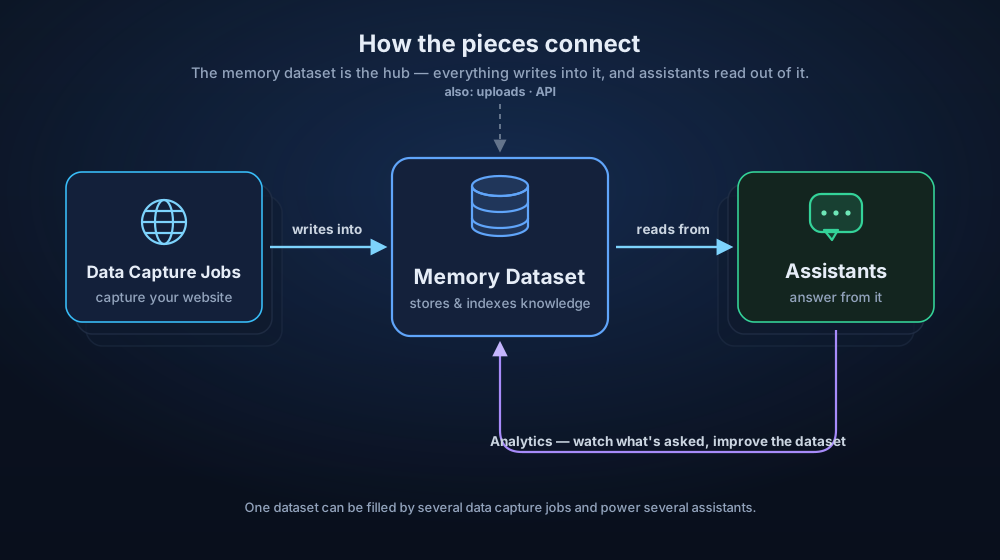
It's a short, one-directional pipeline. A data capture job collects knowledge into a memory dataset; an assistant answers questions grounded in that dataset; analytics show you what to fix. Improve the content, and every answer gets better — you rarely touch the assistant itself.
Plans and Free Trial
Signing in is instant — use Google, Microsoft, or GitHub; there's no new password. Every new workspace starts on a free trial, and you pick a plan when you're ready.
Start free, no card. The trial runs for 15 days and needs no credit card. Add a payment method whenever you want to continue; if you don't, the trial simply pauses when it ends — nothing is charged by surprise.
Seekdown bills on usage — the storage your knowledge takes, the LLM tokens your assistants spend answering, and the proxy bandwidth data capture jobs use to read websites. Basic and Pro bundle a monthly allowance of those and meter any extra at the same per-unit rate; Enterprise bundles nothing and is fully pay-as-you-go.
| Plan | Who it's for | Bundled each month |
|---|---|---|
| Basic | A single site or a first assistant | 1 GB storage · 4M LLM tokens · 10 GB standard + 1 GB residential proxy |
| Pro | Busier assistants and larger sites | 3 GB storage · 12M LLM tokens · 30 GB standard + 3 GB residential proxy |
| Enterprise | High or spiky volume, with budget control | Pay-as-you-go — no bundled usage, pay per unit, unlimited scale |
What a trial workspace can do
A trial can create one assistant, one data capture job, and one memory dataset, with website crawls at the Preview scope (up to 100 pages). That's plenty to go live on a small site or a focused set of pages — upgrade when you need more.
For current prices and a usage cost estimator, see the pricing page.
What Happens Next
The rest of this guide is the whole journey, one page at a time:
- Create your first assistant — the wizard builds it for you.
- Share it for feedback — invite a few people to try it before it's live.
- Add it to your website — copy, paste, live.
- Customize it — tune how it looks and answers.
- Customize your scraper — control exactly what it learns from your site.
- Add documents — top up its memory with files.