Answer customers on WhatsApp from your own content
Publish your Seekdown assistant on a WhatsApp Business number. It uses the same knowledge and behaviour as on your website.
- Answer questions in the chat app your customers already use.
- Pass the conversation to your team when a customer asks for a person.
- Follow WhatsApp conversations in Live support and Analytics, next to your website ones.
A welcome, quick replies and a direct answer
The first message says the customer is talking to an AI. Your assistant’s suggestions appear as buttons, next to the option to talk to a person.
Hi
10:01Hi! I’m Acme’s virtual assistant (AI). How can I help?
10:01How long do I have to return an order?
10:02You have 30 days from delivery to return an item. Start the return from your account and print the label.
acme.example/returns
10:02Example conversation with sample data.
Configure each number with a phone preview
In the assistant’s Channels tab, choose who answers, write the welcome and decide when a person takes over. The preview shows the result as WhatsApp will display it.
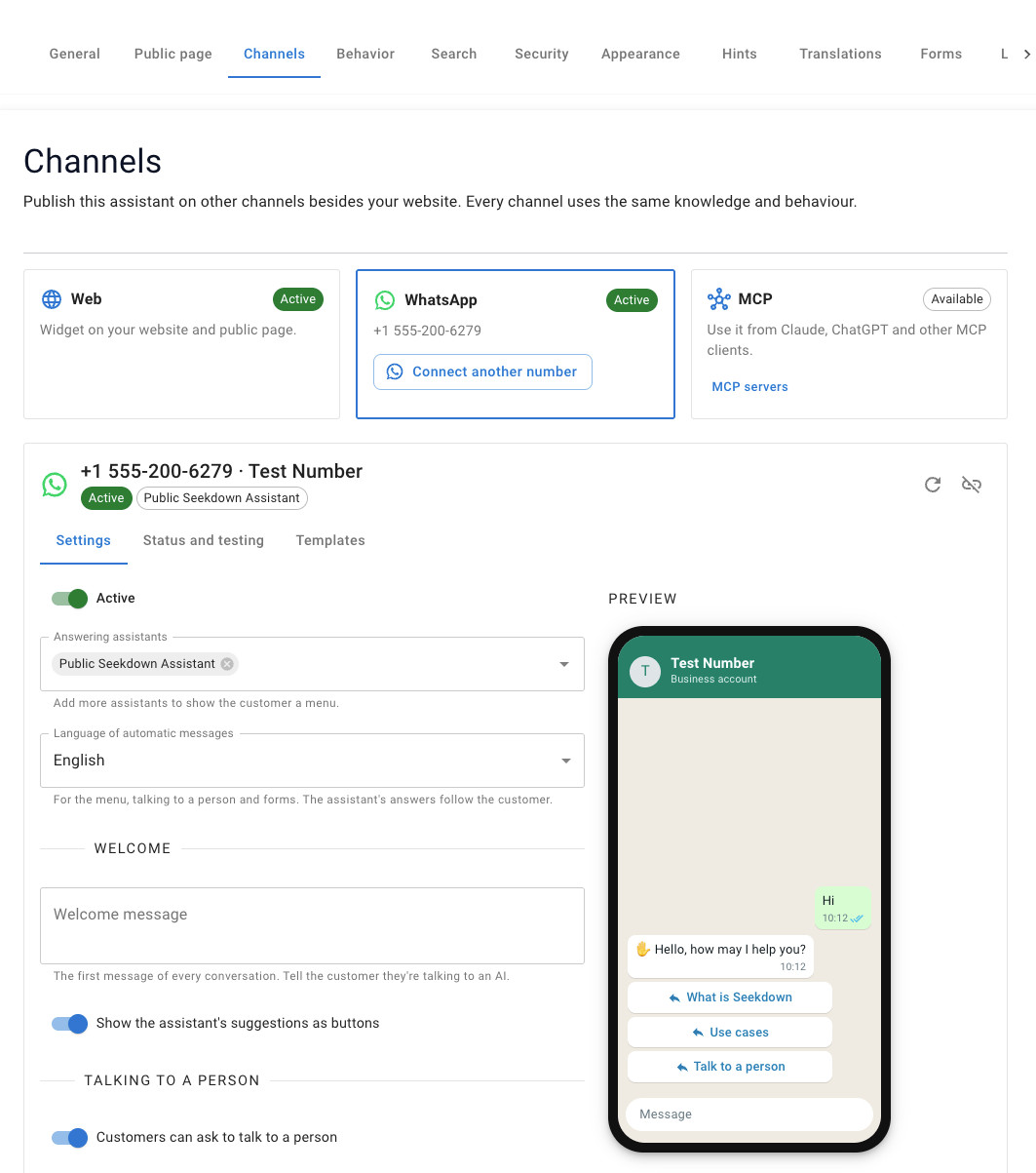
From your assistant to a WhatsApp number
WhatsApp is another channel of the same assistant. You don’t build a second bot or copy your content.
Choose an assistant
Use one you already have, or create one from your website or documents.
Connect a number
Continue with Meta to pick your business and number, or enter the number’s details from Meta for Developers.
Decide who answers
One assistant per number, or a menu where the customer picks one of up to ten assistants.
Test and share it
Scan the QR code with your phone, then share the wa.me link or add a WhatsApp button to your site.
Your assistant, adapted to how WhatsApp works
Seekdown handles the parts that are different from a website chat.
Say it’s an AI from the start
The welcome tells customers they’re talking to an AI. You write it once per number.
Answers that read well in a chat
Seekdown converts answers to WhatsApp formatting and adds up to three links to the sources.
A person when they ask for one
Customers tap a button or type words you choose. Outside your team’s hours, the assistant keeps helping.
Forms inside the chat
The assistant asks for each field in turn and checks emails, numbers, dates and options.
Templates to pick conversations back up
Create a Meta-approved template in Seekdown and send it after the 24-hour window closes.
A channel filter in Analytics
See what people ask on WhatsApp. Phone numbers are replaced by a pseudonym.
When a customer needs someone from your team
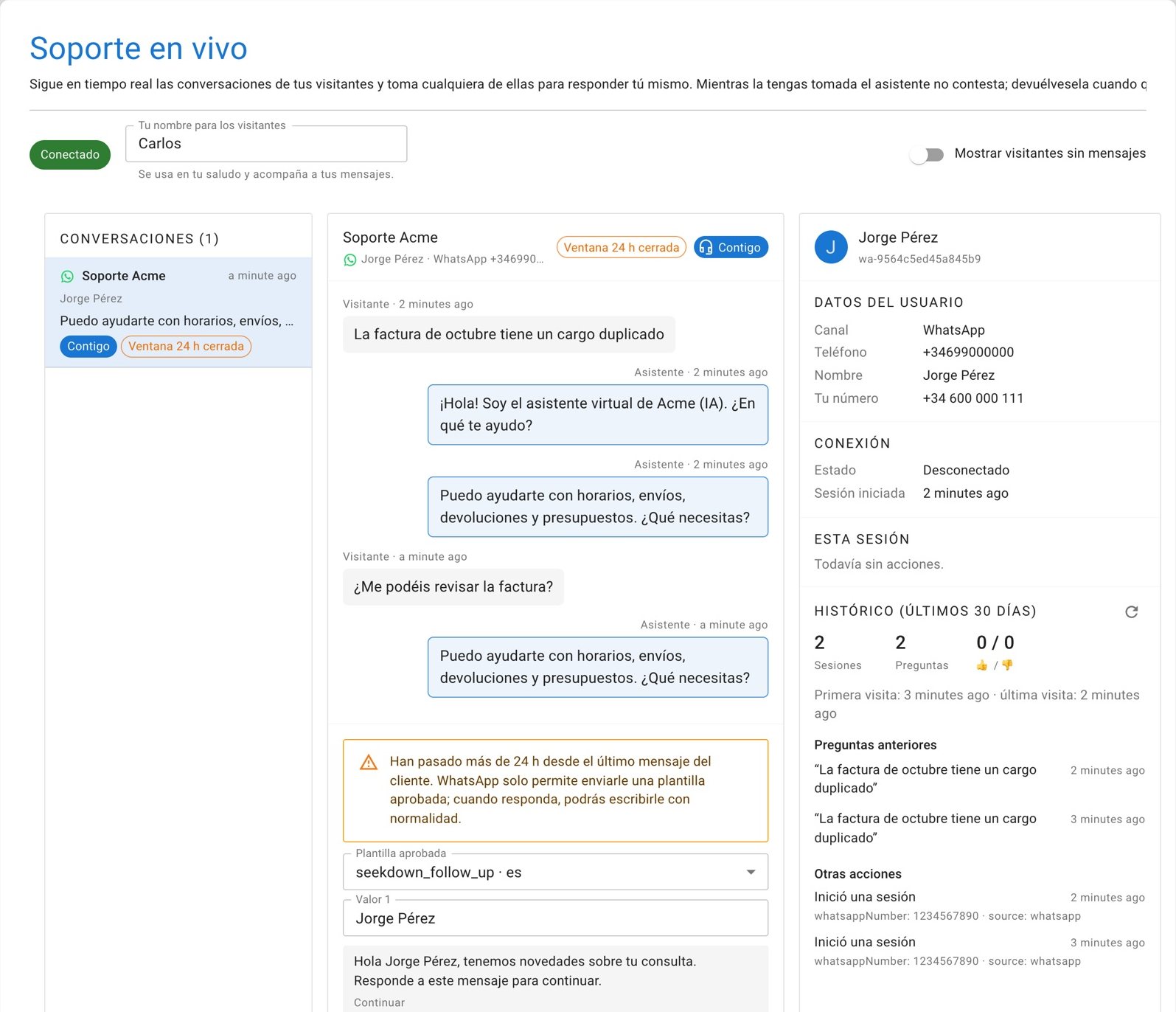
WhatsApp conversations appear in Live support with the website ones. Your team replies from the console and the customer reads it in the same chat.
- See who is waitingEach conversation shows the WhatsApp icon and how long is left of the 24-hour window.
- Take over and hand backWhile you hold a conversation the assistant stays silent. Hand it back when you’re done.
- No conversation left waitingIf nobody picks it up within the minutes you set, the assistant takes it back.
- Reply after 24 hoursOnce the window closes, choose an approved template and fill in its blanks.
Three things from Meta
The number and its WhatsApp Business account stay yours. Seekdown connects to them.
Access to your business on Meta
A Facebook account that manages your business. If the business isn’t on Meta yet, it’s created during sign-up.
A phone number
One that isn’t on WhatsApp yet, or your WhatsApp Business number if you want to keep using the app as well.
A payment method at Meta
Meta bills WhatsApp messaging fees directly to your business. Seekdown answers use your plan as they do on your website.
- For now the assistant reads text. If a customer sends audio, images or files, it replies with a message you choose.
- Disconnecting a number deletes its conversations and the Meta credentials stored in Seekdown. The number stays yours at Meta.
- The full setup, settings and limits are in the WhatsApp documentation.
Moving your WhatsApp support to an assistant?
Tell us how customers write to you today and how your team works. We’ll help you plan the numbers, the assistants and the hand-off to your team.