Use a WooCommerce AI chatbot for product answers
A WooCommerce store already publishes product descriptions, specifications, categories, and policies. A website AI chatbot can make those public sources easier to query, but it should not imply access to orders, customer accounts, or live stock unless that access has been separately implemented.
Choose the public sources
Include pages that support shopper decisions:
- current product details and specifications;
- category and buying-guide pages;
- shipping, return, and warranty policies;
- sizing or compatibility guides; and
- store FAQs.
Exclude cart, checkout, account, login, tag, and internal search pages. Treat variable product URLs carefully so the dataset does not contain several conflicting copies of one item.
Capture and inspect the store
Configure a website data capture job for the store hostname and relevant paths. Review discovered links and search the dataset for a sample of product names, prices, variant text, and policy exceptions.
The chatbot can only use the information present in the captured source. If the page says "contact us for availability", the answer should preserve that wording rather than report the item as available.
Install the assistant in WordPress
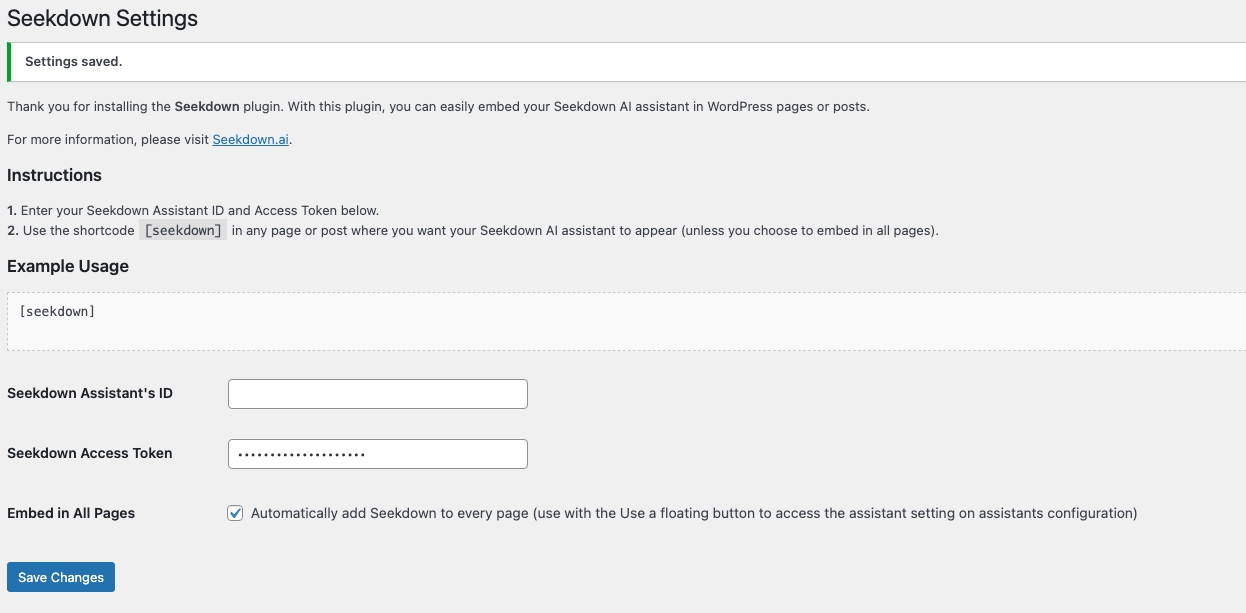
Seekdown's documented WordPress flow uses its plugin:
- Download the plugin ZIP from the assistant deployment page.
- In WordPress, open Plugins → Add New → Upload Plugin.
- Upload and activate the ZIP.
- Open Settings → Seekdown.
- Add the assistant ID and access token when required.
- Choose site-wide embedding or place the [seekdown] shortcode on selected pages.
Test store-specific failure cases
Ask about:
- a product with variants;
- a sale price and regular price;
- compatibility stated in a guide;
- an exception in the returns policy;
- a product detail the page does not state; and
- an order-specific request.
The first four should use the relevant public source. The missing detail should produce a careful limitation. The order-specific request should follow the configured handoff because a public-content assistant does not know the shopper's account.
A WooCommerce AI chatbot is useful when it explains published product information and links shoppers back to it. Keep transactional claims outside its scope unless they are supported by a verified integration.