Common mistakes when launching a website AI chatbot
A chatbot can appear correctly on the page and still be unready. Launch quality depends on the source set, response boundaries, security settings, and the team's ability to diagnose weak answers.
Use these failure modes as a release review.
Capturing the whole website without review
Symptom: Answers cite tag pages, old campaigns, account screens, or obsolete docs.
Check: Review discovered links, hostnames, included paths, excluded paths, depth, and the dataset contents.
Fix: Narrow the scope and remove unwanted records before publishing.
Testing only questions that were written for the demo
Symptom: Internal tests pass, but visitor wording retrieves unrelated pages.
Check: Use questions copied from support, site search, sales, and onboarding. Include short, vague, and misspelled versions.
Fix: Improve the source terminology, retrieval set, or question hints based on the failing stage.
Leaving unsupported questions undefined
Symptom: The chatbot fills a documentation gap with a plausible answer.
Check: Ask about a capability, policy, and account detail that the public sources do not contain.
Fix: Configure a careful limitation and the correct contact path.
Showing answers without useful sources
Symptom: The answer looks specific, but the visitor cannot verify it.
Check: Open each citation and locate the fact. A homepage link does not support a detailed policy claim.
Fix: Capture the authoritative page and keep source links visible.
Forgetting allowed origins or access settings
Symptom: The assistant works in the playground but not on the published site, or it appears on an unintended origin.
Check: Review the assistant's Security settings and test both an allowed and disallowed origin.
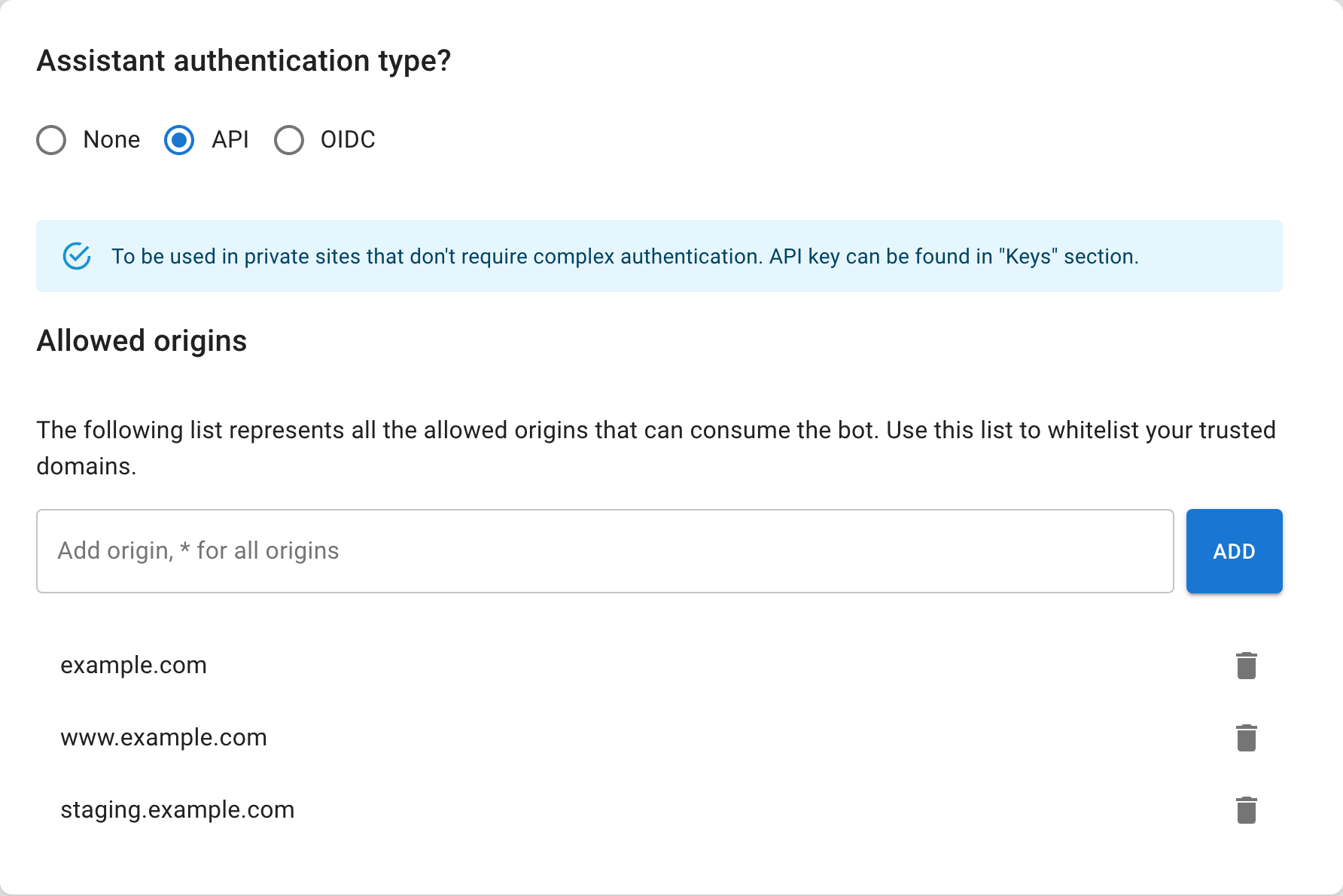
Fix: Add only the required origins and use the documented authentication mode.
Publishing an incomplete embed
Symptom: No interface appears, or the browser reports that the runtime is unavailable.
Check: Confirm the runtime script, container element, assistant ID, access token when required, and initialization call are present.
Fix: Use the snippet generated by Seekdown and inspect the browser console.
Launching without maintenance ownership
Symptom: Answers drift after pricing, policy, or documentation changes.
Check: Name the source owner, capture cadence, and regression question for each important content area.
Fix: Schedule supported capture jobs or document the manual refresh step.
Release gate
Do not publish until the team can demonstrate:
- approved sources and excluded areas;
- passing questions and expected citations;
- safe behavior for missing information;
- correct allowed-origin behavior;
- a working embed on the production-like domain;
- a refresh and re-test process; and
- a person responsible for reviewing conversation findings.
A successful launch is a repeatable answer workflow, not merely a visible widget.